


Introduction to Windows 11 Pro for Hybrid Teams
As businesses continue to adapt to hybrid work models, the need for robust technology solutions has never been more critical. Windows 11 Pro emerges as a pivotal tool in enhancing productivity and security for remote teams. With features like Remote Desktop, Dynamic Lock, and Group Policy, organizations can configure their systems to meet the demands of a flexible workforce. This article explores how these features can be effectively utilized to create a secure and efficient work environment.
Understanding Remote Desktop Capabilities
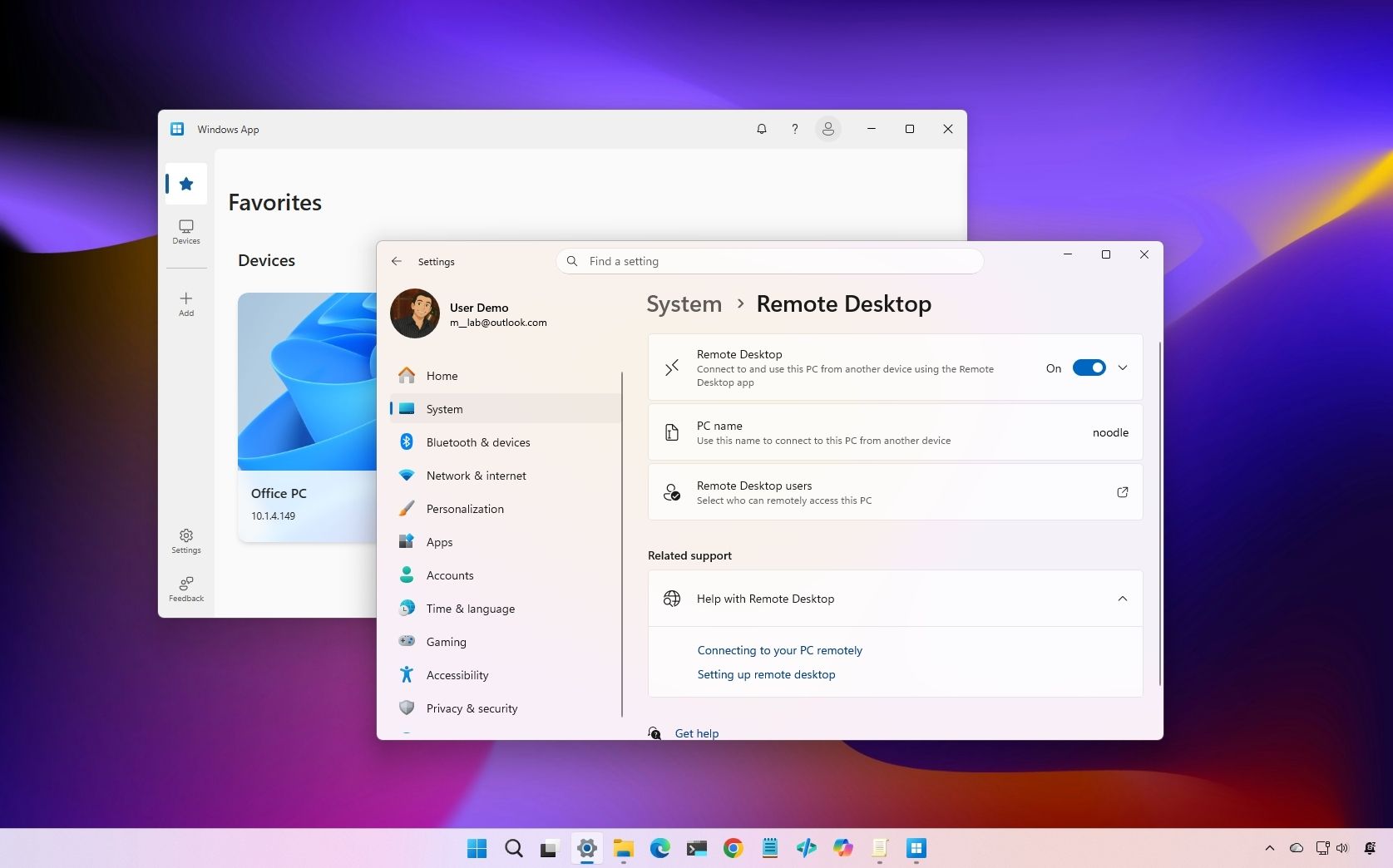
Remote Desktop is a cornerstone feature of Windows 11 Pro that allows users to connect to their office computers from any location. This capability is particularly advantageous for hybrid teams, enabling employees to access necessary files and applications seamlessly. By leveraging Remote Desktop, organizations can maintain business continuity while ensuring that employees remain productive, regardless of their physical location.
Setting up Remote Desktop requires a few essential steps. First, IT administrators must enable the feature on the host computer, ensuring it is configured to accept remote connections. Additionally, security protocols must be established to protect sensitive data during remote sessions. This includes using strong passwords, enabling network-level authentication, and considering the use of a Virtual Private Network (VPN) for added security.
Enhancing Security with Dynamic Lock
Security remains a paramount concern for businesses operating in a hybrid model. Windows 11 Pro addresses this with the Dynamic Lock feature, which automatically locks a device when the user steps away. This functionality is particularly useful in environments where employees may be working in public spaces or shared offices.
To configure Dynamic Lock, users need to pair their Windows device with a Bluetooth-enabled smartphone. Once set up, the system will detect when the user is out of range and initiate the lock process. This proactive security measure minimizes the risk of unauthorized access, ensuring that sensitive information remains protected even when employees are away from their desks.
Implementing Group Policies for Consistency
In a hybrid work environment, maintaining consistency across devices is crucial for both productivity and security. Group Policy in Windows 11 Pro allows IT administrators to enforce specific settings and restrictions across all devices within an organization. This capability ensures that all team members operate under the same guidelines, reducing the likelihood of security breaches and operational discrepancies.
Group Policy can be used to manage a wide range of settings, including user permissions, software installations, and security protocols. By creating specific policies tailored to the needs of hybrid teams, organizations can enhance compliance and streamline the user experience. For instance, IT administrators can restrict access to certain applications or data based on the user's role, ensuring that sensitive information is only accessible to authorized personnel.
Maximizing Remote Productivity with Windows 11 Pro
For hybrid teams, the combination of Remote Desktop, Dynamic Lock, and Group Policy not only enhances security but also significantly boosts productivity. Employees can work from virtually anywhere, accessing their office environment as if they were physically present. This flexibility allows for a more adaptable workforce, capable of responding to business needs in real-time.
Moreover, Windows 11 Pro offers various productivity tools designed to facilitate collaboration and streamline workflows. Features such as virtual desktops, Snap Layouts, and integrated Microsoft Teams enhance the user experience, allowing for efficient multitasking and communication among team members. By harnessing these tools, organizations can foster a culture of collaboration, even in a dispersed work environment.
Challenges and Considerations for Implementation
While the benefits of configuring Windows 11 Pro for hybrid teams are clear, organizations must also navigate potential challenges during implementation. One key consideration is the need for adequate training and support for employees as they transition to new technologies. Providing comprehensive training resources can help ensure that all team members are comfortable using Remote Desktop and other features effectively.
Additionally, organizations must be vigilant about maintaining security protocols. As remote work increases, so does the risk of cyber threats. It is essential for IT departments to regularly update security measures, monitor for unusual activity, and educate employees on best practices for protecting sensitive information. This proactive approach can mitigate risks and safeguard organizational data.
Future Trends in Hybrid Work Technology
The landscape of hybrid work is continually evolving, and technology will play a pivotal role in shaping its future. As organizations increasingly rely on cloud-based solutions and collaborative tools, the demand for robust operating systems like Windows 11 Pro will grow. This trend underscores the importance of staying ahead of technological advancements to maintain a competitive edge.
Moreover, as more companies embrace flexible work arrangements, the integration of artificial intelligence and machine learning into operating systems is likely to become more prevalent. These technologies can automate routine tasks, enhance security measures, and provide insights into employee productivity, further optimizing the hybrid work experience.
Conclusion: Embracing the Future of Work
Configuring Windows 11 Pro for hybrid teams is not merely a technological upgrade; it represents a strategic shift in how organizations approach work. By leveraging features like Remote Desktop, Dynamic Lock, and Group Policy, businesses can create a secure and productive environment that supports the evolving needs of their workforce.
As companies navigate the complexities of hybrid work, embracing these technologies will be essential for fostering collaboration, enhancing security, and driving overall productivity. The future of work is here, and organizations that proactively adapt to these changes will be well-positioned for success in an increasingly digital landscape.